

Sharing a queue between tasks
Declare a queue withqueue() and set it on several tasks to interleave their runs in one queue. Runs from every task on the queue start in the order they were triggered, whichever task they belong to:
/trigger/emails.ts
If what you want to share is a concurrency cap rather than ordering, you don’t need a shared
queue: declare a named limit with
concurrencyLimit() and each task keeps its own queue while
drawing from the shared limit. See sharing a limit between
tasks.limit/ are reserved for concurrency limits and are rejected at deploy time.
Setting the queue when you trigger a run
When you trigger a task you can override its queue by name. This is really useful if you sometimes have high priority runs:/trigger/override-queue.ts
app/api/push/route.ts
Priority
You can re-order runs within a queue at trigger time by giving them a priority: You can set a priority when you trigger a run. This allows you to prioritize some of your runs over others, so they are started sooner. This is very useful when:- You have critical work that needs to start more quickly (and you have long queues).
- You want runs for your premium users to take priority over free users.
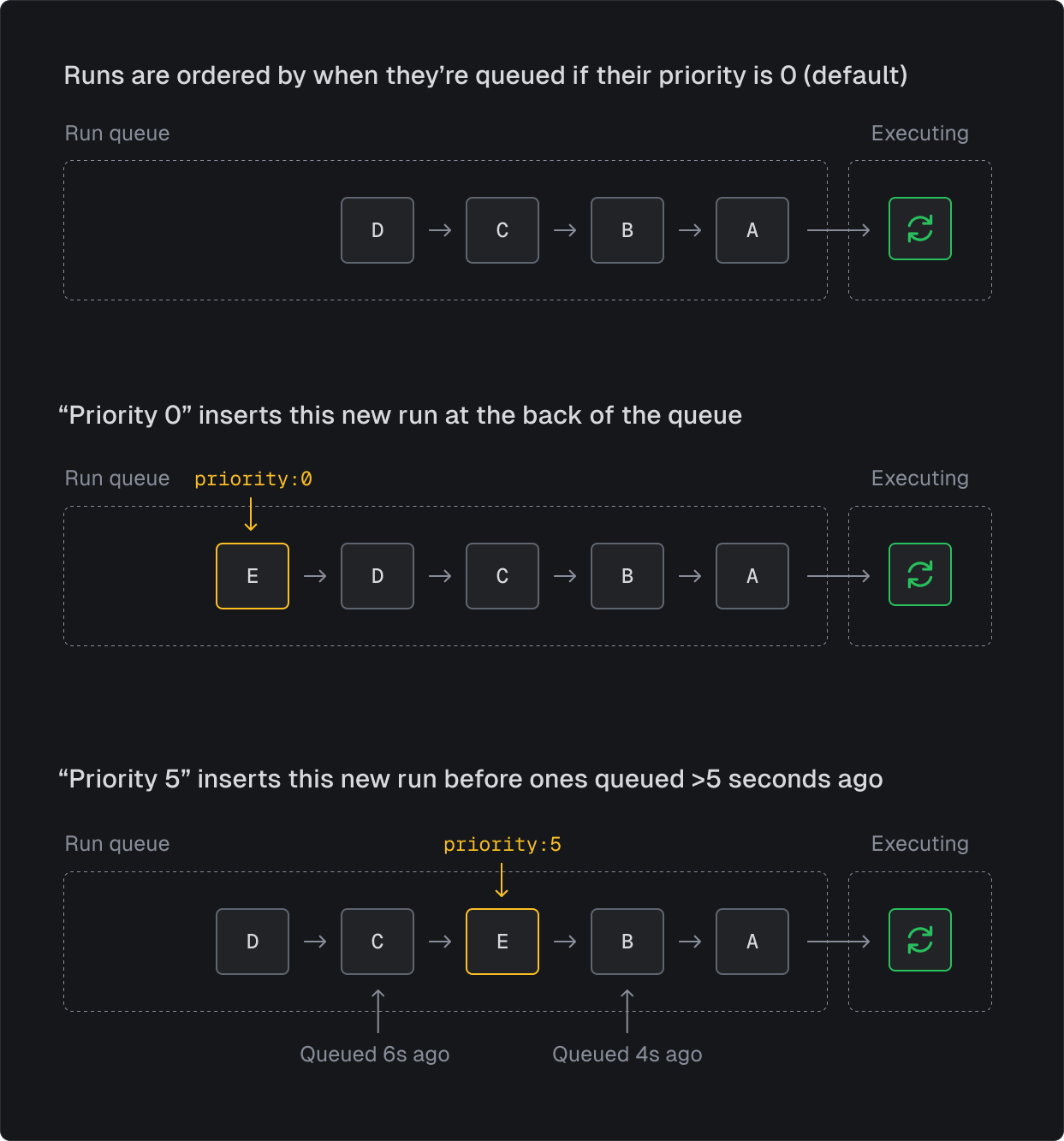
10 the run will dequeue before runs that were triggered with no priority 8 seconds ago, like in this example:
3600 the run would dequeue before runs that were triggered an hour ago (with no priority).
Setting a high priority will not allow you to beat runs from other organizations. It will only
affect the order of your own runs.
Archiving queues
Queues are created when you deploy, so renaming a queue or deleting a task leaves its old queue behind. To tidy up the list, open the queue’s menu on the Concurrency page in the dashboard and choose Archive. Archiving only hides the queue in the dashboard, and it doesn’t affect runs. Archived queues don’t count towards the Allocated total, even if they have runs. To see them, turn on the Show archived toggle; to bring one back, choose Unarchive from its menu.- You can only archive a queue that your current deployment no longer declares.
- You can’t archive a queue while it has runs waiting or in progress, or while it’s paused or its concurrency limit or
totallimit is 0. - If an archived queue gets new runs, it stays hidden, but a warning above the list names it until it’s empty.
- Pausing an archived queue, or setting its concurrency limit or
totallimit to 0 (including by resetting an override), unarchives it. - If a later deploy declares the queue again, it’s unarchived automatically.
- The SDK and API still list archived queues.
Some runs belong to a queue without currently sitting in it, so they don’t count as activity:
delayed runs that haven’t reached their start time yet, runs waiting for a deploy of their
version, runs that are waiting (for example on
wait.for or a child task) or have been
checkpointed, and, depending on how the engine is configured, runs with a concurrency key that
have been handed to a worker but not picked up yet. A queue with only runs like these can be
archived, and the warning won’t name it until one of them is back in the queue or running. These
runs still execute normally and always show on the Runs page.Managing queues with the SDK
The SDK provides aqueues namespace that allows you to manage queues programmatically. You can list, retrieve, pause, resume, and modify concurrency limits for queues.
Import from
@trigger.dev/sdk:Listing queues
You can list all queues in your environment with pagination support:Retrieving a queue
You can retrieve a specific queue by its ID, or by its type and name:version discriminates the shape: